
Imagine opening an InDesign file and finding that all the necessary fonts are just there!
Not because you simply have all the fonts enabled on your system, but because someone has placed the necessary document fonts in the “Document fonts” folder!
And that someone is the Octopus!
You know how it is: You open a document you worked on two years ago. Or you open an InDesign file from a coworker.
The first thing you notice is that some fonts are missing!! Now the search begins!
“Where did I file the documents from that client?”
“Where did my colleague put the project documents?”
As if by magic, the “document fonts” are always right there alongside all the InDesign files! 😍
That is a feature in InDesign, introduced by Adobe ages ago. All fontsin a folder named “Document fonts” next to the InDesign document are available in the document!
The advantage is that you don’t have to keep all the fonts available in the system for every project!
This feature is known as the “Pack” command. It collects not only the InDesign document and the linked images, but also the necessary fonts.
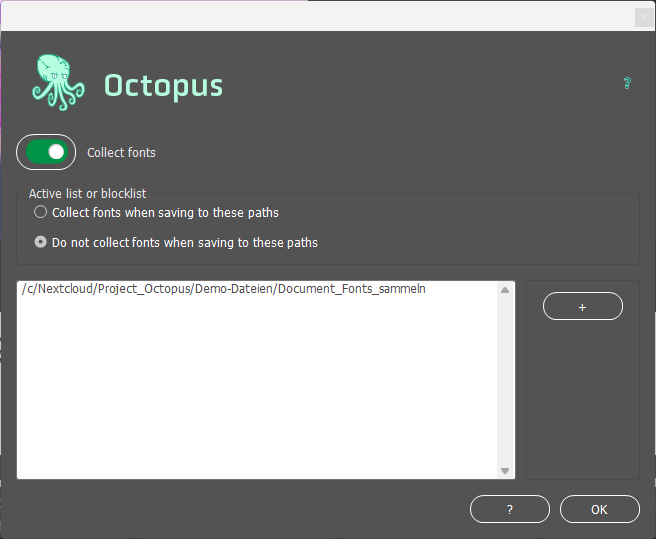
Setup is very easy.
If you want to use this feature, you’ll need to turn it on using the slider.
There are two modes: Active List or Block List.
“Collect fonts when saving to these paths” means that the script collects the “document fonts” from the files listed in the path list below, but not from documents that are not located in those paths.
“Do not collect fonts when saving to these paths” means that the “Document Fonts” are collected for all documents except those listed in the path list. Clear?
Clicking the button with the plus sign opens a dialog box where you can define the paths. The “document fonts” from the InDesign files located in these paths are then collected (Active List). or not collected (block list).
This happens when a font is not active. In that case, the script obviously cannot place the font in the "Document fonts" folder. And because the font is missing, the font family name cannot be read and displayed.
For technical and legal reasons, the script cannot place Adobe Fonts in the "Document fonts" folder.
Hmm, I wonder what could be causing that?
For one thing, it's certainly possible that the document isn't in a folder on the "Active List"!
On the other hand, it’s possible, of course, that the document doesn’t contain any text?! 😮